
WhatsApp for Clinics: 68 Ready-to-Use Message Templates Every Doctor Should Have (Buy Now)
WhatsApp has become one of the most convenient communication channels for many clinics and healthcare practices.
Patients use WhatsApp to ask about appointments, confirm timings, request information, communicate with reception staff, receive reminders and stay connected with their healthcare provider.
For a small clinic, this can be extremely useful.
But it can also create a problem:
How do you respond to dozens of similar patient messages every day without spending hours typing the same replies?
A patient asks:
"Can I get an appointment tomorrow?"
Another asks:
"What are your clinic timings?"
Someone wants to reschedule.
Another patient needs a follow-up reminder.
Someone asks about payment.
Another asks for their medical records.
And suddenly, your doctor, receptionist or clinic administrator is spending a significant amount of time writing WhatsApp messages.
The solution isn't to stop using WhatsApp.
The solution is to create a structured WhatsApp communication system for your clinic.
In this guide, we'll explore how doctors and clinics can use WhatsApp more efficiently, what types of messages are useful throughout the patient journey, common communication mistakes to avoid, and how ready-made WhatsApp scripts can simplify daily clinic operations.
Why WhatsApp Is Useful for Clinics
For many patients, WhatsApp is familiar, convenient and easy to use.
A clinic can use WhatsApp for appropriate administrative and communication purposes such as:
-
Appointment enquiries
-
Appointment confirmations
-
Appointment reminders
-
Follow-up communication
-
Clinic timing information
-
Location information
-
General service enquiries
-
Teleconsultation coordination
-
Health camp announcements
-
Review requests
-
Payment communication
-
Administrative follow-ups
Used responsibly, WhatsApp can become an important part of a clinic's patient communication workflow.
However, clinics should establish appropriate privacy, consent, record-keeping and communication practices.
The Problem With Writing Every WhatsApp Message From Scratch
Imagine a receptionist receives 30 appointment-related enquiries in one day.
Without templates, the receptionist may type variations of:
"Hello, thank you for contacting our clinic. Please let us know your preferred date and time for an appointment."
again and again.
Now multiply this across:
-
Appointment enquiries
-
Confirmations
-
Reminders
-
Follow-ups
-
Reviews
-
Payments
-
Teleconsultations
-
Health camps
-
Patient recalls
The problem isn't only typing.
It is repeated decision-making.
Your team has to decide:
What should I say?
How should I say it?
Did I include the appointment time?
Did I mention the doctor's name?
Did I provide the right contact information?
A template library turns these repeated decisions into a much simpler process.
What Are WhatsApp Scripts and Templates for Clinics?
A WhatsApp script is a pre-written communication format designed for a specific situation.
For example:
Situation: Appointment enquiry
Template: A professional response requesting the patient's preferred date and time.
Instead of creating the message from scratch, your team can:
Find → Customize → Review → Send
This creates a more consistent communication process.
Why Clinics Should Use WhatsApp Templates
1. Save Time
Your staff doesn't have to type the same messages repeatedly.
2. Improve Consistency
Different staff members can use a common communication framework.
3. Reduce Communication Errors
A template can remind staff to include important details such as:
-
Date
-
Time
-
Doctor
-
Clinic
-
Contact number
4. Improve Patient Experience
Clear and timely communication makes administrative interactions easier for patients.
5. Make Staff Training Easier
New receptionists or administrative staff can quickly understand how common situations should be handled.
6. Create a Repeatable Workflow
Instead of relying entirely on individual staff members, the clinic can establish a documented communication process.
The Patient Journey and WhatsApp Communication
One of the best ways to organize clinic WhatsApp messages is to think about the patient journey.
A typical journey may look like:
Enquiry → Appointment → Confirmation → Reminder → Visit → Follow-up → Recall → Review → Referral
Different messages are useful at different stages.
Let's look at each stage.
1. First Enquiry Messages
The first WhatsApp interaction can create an early impression of your clinic.
A patient may ask:
"Do you treat this condition?"
or:
"I want to book an appointment."
Instead of sending a short or unclear response, your clinic can use a structured enquiry template.
A good enquiry response can include:
-
Greeting
-
Clinic name
-
Relevant information
-
Doctor/service information
-
Next step
-
Contact details
The goal is to make it easy for the patient to continue the conversation.
2. Appointment Booking Messages
Once a patient wants an appointment, the communication should become specific.
Useful details can include:
-
Patient name
-
Doctor name
-
Date
-
Time
-
Clinic location
-
Arrival instructions
-
Contact information
A standardized appointment template can reduce the chance of missing important information.
3. Appointment Confirmation
Once the appointment has been booked, send a confirmation message.
A simple confirmation can communicate:
Your appointment is confirmed for [Date] at [Time] with [Doctor] at [Clinic].
You can also include practical instructions such as arriving a few minutes early where appropriate.
4. Appointment Reminder Messages
Patients are busy.
An appointment reminder can help reduce confusion about upcoming visits.
Depending on your workflow, reminders may be sent according to an appropriate schedule.
A reminder should generally be:
-
Clear
-
Short
-
Polite
-
Easy to understand
Avoid making reminders unnecessarily complicated.
5. Rescheduling Messages
Patients may need to change an appointment.
A ready-made rescheduling template can help reception staff respond consistently.
For example, the workflow can be:
Patient requests change → Confirm available slots → Update appointment → Send confirmation
Having templates for each stage makes this process easier.
6. After-Visit Messages
Communication shouldn't necessarily stop when the patient leaves the clinic.
Depending on the service and clinical workflow, a clinic may send appropriate post-visit administrative or follow-up communication.
For example:
-
Thank-you message
-
Follow-up reminder
-
Appointment information
-
General instructions
-
Request to contact the clinic if clarification is needed
Any clinical instructions should be accurate and consistent with the healthcare professional's advice.
7. Recall and Retention Messages
Some patients may need to return for:
-
Follow-up consultation
-
Routine review
-
Ongoing treatment
-
Periodic check-up
-
Scheduled procedure
A recall system can help the clinic communicate with appropriate patients.
Instead of manually remembering every follow-up, clinics can use a structured process supported by their patient management system and appropriate communication templates.
8. Review Request Messages
Patient feedback can help a clinic understand the patient experience.
A review request should be polite and voluntary.
Avoid pressuring patients to leave a positive review.
A simple message can ask whether the patient would be willing to share their experience or feedback.
9. Referral Communication
If appropriate for your practice and applicable rules, a clinic can also use communication templates when patients refer family members or friends.
The focus should remain professional and should not involve inappropriate incentives or misleading claims.
10. Payment Messages
Payment-related conversations can sometimes become uncomfortable.
A clear template can make communication more professional.
Templates can be used for:
-
Payment confirmation
-
Outstanding payment reminders
-
Invoice information
-
Package/payment queries
-
Administrative clarification
Keep financial communication factual and respectful.
11. Day-Care Procedure Messages
Clinics that perform day-care procedures may need additional communication before and after the procedure.
Messages may relate to:
-
Appointment confirmation
-
Arrival time
-
Preparation instructions
-
Documents to bring
-
Post-procedure follow-up
-
Contact information
Clinical preparation instructions should be reviewed and approved by the appropriate healthcare professional.
12. Teleconsultation Messages
Telemedicine creates additional communication steps.
A clinic may need to communicate:
-
Appointment confirmation
-
Consultation time
-
Platform or meeting instructions
-
Payment information
-
Documents or reports to keep ready
-
Follow-up instructions
A dedicated teleconsultation communication workflow can reduce confusion.
Healthcare providers should ensure that their telemedicine practices comply with applicable guidelines and requirements.
13. Health Camp Messages
Clinics frequently organize:
-
Health camps
-
Screening activities
-
Awareness programs
-
Community events
-
Wellness sessions
WhatsApp can be useful for communicating event information to appropriate audiences.
Messages can include:
-
Event name
-
Date
-
Time
-
Location
-
Services
-
Registration process
-
Contact information
Avoid making unsupported medical claims in promotional messages.
14. Promotional Messages
Clinics may occasionally communicate relevant offers, packages or events.
However, healthcare promotion should be handled carefully.
Your communication should be:
Clear + Accurate + Professional + Appropriate
Avoid exaggerated promises such as:
-
"Guaranteed cure"
-
"100% result"
-
"Permanent cure for everyone"
-
"No-risk treatment"
The exact advertising and professional requirements applicable to your specialty and jurisdiction should be reviewed before publishing promotional healthcare content.
Handling Difficult Patient Conversations
Not every WhatsApp conversation will be simple.
A clinic may receive messages such as:
"Why is the consultation fee so high?"
"I want my records immediately."
"I'm unhappy with the service."
"I have an emergency."
These situations require more care than routine appointment messages.
A script can provide a starting point, but staff should know when a conversation needs to be escalated to a doctor, clinic manager or appropriate service.
Emergency Messages Need Special Attention
WhatsApp should not be treated as an emergency medical service.
If someone reports symptoms suggesting a medical emergency, the clinic's communication should direct the person toward appropriate emergency medical care or local emergency services, rather than relying on a routine WhatsApp conversation.
Staff should have a clear escalation protocol.
Patient Privacy and WhatsApp Communication
Healthcare communication involves sensitive information.
Before implementing WhatsApp as part of your clinic's workflow, consider:
-
What information is being shared?
-
Who has access to the account?
-
Is patient consent appropriate or required?
-
How are conversations stored?
-
Who can access the device?
-
What happens when staff leave the organization?
-
Are unnecessary patient details being shared?
-
What privacy and data-protection requirements apply?
Clinics should establish appropriate privacy and security procedures.
Avoid sharing unnecessary sensitive information through messaging platforms.
Don't Send Patient Information Carelessly
For example, instead of unnecessarily sending extensive clinical information through WhatsApp, consider whether the information is actually needed for the communication.
A good principle is:
Share only what is necessary for the intended purpose.
Your clinic should also establish appropriate policies for:
-
Access control
-
Device security
-
Account management
-
Patient communication
-
Record retention
-
Staff responsibilities
Why Templates Should Be Editable
No two clinics operate exactly the same way.
A dental clinic may need different messages from an Ayurvedic Panchakarma centre.
A dermatology practice may communicate differently from a general physician.
A day-care centre may need more preparation and discharge communication.
That's why a good template should provide a starting point, not force every clinic to use identical wording.
Editable templates allow you to customize:
[Clinic Name]
[Doctor Name]
[Patient Name]
[Date]
[Time]
[Phone Number]
[Clinic Address]
This makes the same template adaptable to different practices.
The Importance of Highlighting Placeholders
One surprisingly common mistake is forgetting to replace a placeholder.
Imagine accidentally sending:
"Dear [Patient Name], your appointment with [Doctor Name] is confirmed."
That immediately makes the communication look automated and unfinished.
A good template system should make placeholders easy to identify.
Using highlighted fields such as:
[Patient Name]
[Clinic Name]
[Date]
helps staff identify what needs to be changed before sending.
WhatsApp Quick Replies for Clinics
If your clinic receives repetitive enquiries, quick replies can make communication faster.
For example:
| Shortcut | Use |
|---|---|
/greeting |
New enquiry |
/appointment |
Appointment booking |
/confirm |
Appointment confirmation |
/reminder |
Appointment reminder |
/followup |
Follow-up |
/payment |
Payment query |
/teleconsult |
Teleconsultation |
/review |
Review request |
The exact shortcut system can be customized to your clinic's workflow.
How to Build a Clinic WhatsApp Communication System
You don't need dozens of complicated procedures.
Start with these five steps.
Step 1 — List Common Patient Questions
Look at the WhatsApp conversations your clinic receives regularly.
Identify repetitive situations.
Step 2 — Group Them
Create categories such as:
-
Enquiries
-
Appointments
-
Reminders
-
Follow-ups
-
Payments
-
Teleconsultation
-
Reviews
Step 3 — Write Standard Templates
Create a professional response for each common situation.
Step 4 — Add Personalization Fields
Use placeholders for:
-
Patient
-
Doctor
-
Clinic
-
Date
-
Time
-
Contact details
Step 5 — Train Your Team
Make sure staff understand:
-
Which template to use
-
What information to replace
-
When to escalate
-
What information should not be shared
-
When a doctor should respond
68 WhatsApp Templates in One Pack
Creating all these templates from scratch can take considerable time.
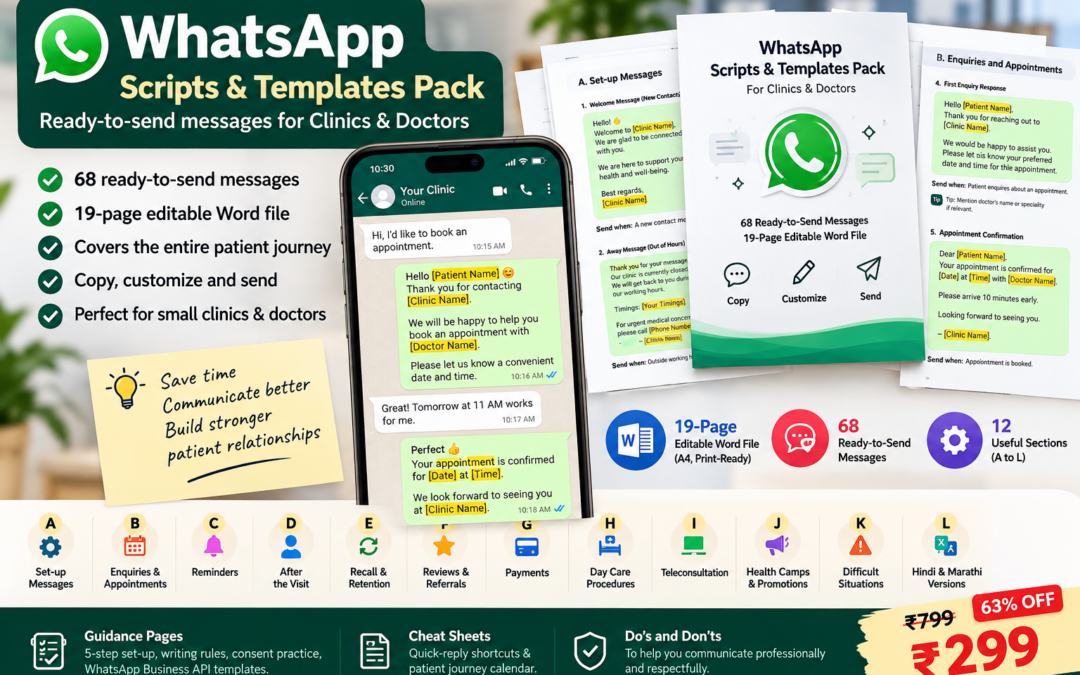
That's why DigiHaven by SK Brand Tech created the WhatsApp Scripts & Templates Pack for Clinics & Doctors.
It contains 68 ready-to-send messages in a 19-page editable Word document.
The pack is designed to help small clinics build a more organized WhatsApp communication workflow.
What's Included in the WhatsApp Scripts & Templates Pack?
The templates are organized into 12 sections.
A. Set-Up Messages
Greeting, away message and profile communication.
B. Enquiries & Appointments
New enquiries and appointment communication.
C. Reminders
Appointment and follow-up reminders.
D. After the Visit
Post-visit communication.
E. Recall & Retention
Follow-up and patient recall.
F. Reviews & Referrals
Feedback, reviews and referrals.
G. Payments
Payment-related communication.
H. Day-Care Procedures
Procedure-related communication.
I. Teleconsultation
Online consultation communication.
J. Health Camps & Promotions
Event and promotional communication.
K. Difficult Situations
Price queries, emergencies, complaints and records.
L. Hindi & Marathi
Six key messages translated/adapted for Hindi and Marathi communication.
More Than Just 68 Messages
The pack also includes practical resources to help implement the templates.
5-Step Setup Guide
Get your clinic's communication system organized.
Writing Rules
Guidelines for clear and professional patient communication.
Consent Practice
Considerations for appropriate communication and consent.
WhatsApp Business API Guidance
A section explaining how the messages can be adapted as WhatsApp Business API templates.
Quick-Reply Shortcut Table
Create shortcuts for frequently used messages.
Patient Journey Calendar
Map messages to different stages of the patient journey.
Do & Don't Guide
Practical reminders for professional WhatsApp communication.
Who Can Benefit From WhatsApp Templates?
The pack is particularly useful for:
-
Small clinics
-
Individual doctors
-
Ayurvedic clinics
-
Panchakarma centres
-
Dental clinics
-
Wellness centres
-
Day-care facilities
-
Telemedicine practices
-
Clinic receptionists
-
Clinic administrators
-
Healthcare marketing teams
WhatsApp Templates for Ayurvedic & Panchakarma Clinics
Ayurvedic and Panchakarma practices can also use structured communication templates for appropriate administrative interactions.
For example:
-
Consultation enquiries
-
Appointment confirmation
-
Therapy scheduling
-
Follow-up reminders
-
Day-care procedure communication
-
Wellness program enquiries
-
Health camp announcements
The actual message should always reflect the services the clinic genuinely provides.
WhatsApp Communication Should Feel Human
Templates don't mean every message needs to sound robotic.
Think of a template as a framework.
For example, instead of copying the same message without modification, staff can personalize:
"Hello [Patient Name], thank you for contacting [Clinic Name]. Dr. [Doctor Name]'s next available consultation is [Date] at [Time]. Please let us know if you'd like us to reserve the slot for you."
The structure remains consistent while the communication still feels personal.
Common WhatsApp Mistakes Clinics Should Avoid
Mistake 1: Sending Messages Without Personalization
Always replace placeholders before sending.
Mistake 2: Sending Long Messages
Patients often prefer concise, clear communication.
Mistake 3: Using Too Many Emojis
A healthcare practice should maintain an appropriate professional tone.
Mistake 4: Sending Unsolicited Promotional Messages
Consider whether the communication is appropriate and whether consent or other requirements apply.
Mistake 5: Sharing Sensitive Information
Avoid unnecessary sharing of health or personal information.
Mistake 6: Making Medical Diagnoses Over Routine Chat
WhatsApp communication should not replace appropriate clinical assessment.
Mistake 7: Ignoring Complaints
Complaints should be acknowledged professionally and escalated appropriately.
Mistake 8: Treating WhatsApp as an Emergency Service
Emergency situations require appropriate emergency care and escalation.
A Simple Clinic WhatsApp Workflow
A practical workflow can look like this:
New Patient
Greeting → Enquiry → Appointment → Confirmation → Reminder → Visit → Follow-up → Review
Existing Patient
Recall → Appointment → Reminder → Visit → Follow-up
Teleconsultation
Enquiry → Booking → Confirmation → Payment → Consultation → Follow-up
Health Camp
Announcement → Registration → Reminder → Event → Follow-up
A structured template library makes each stage easier to manage.
Final Thoughts
WhatsApp can be a powerful communication tool for clinics, but its effectiveness depends on how systematically it is used.
Instead of allowing every staff member to create messages from scratch, clinics can develop a standardized communication library.
The basic principle is simple:
Find → Customize → Review → Send
With the right templates, your team can spend less time rewriting repetitive messages and more time handling the conversations that actually require human attention.
The WhatsApp Scripts & Templates Pack provides a ready-made starting point with 68 messages covering the patient journey, along with setup guidance, quick-reply shortcuts, a patient journey calendar and professional communication guidelines.
Get the WhatsApp Scripts & Templates Pack
Regular Price: ₹799
Offer Price: ₹299
Save ₹500
68 Ready-to-Send Messages + 19-Page Editable Word File
Includes:
✓ 68 WhatsApp scripts
✓ 12 communication categories
✓ Appointment templates
✓ Reminder templates
✓ Follow-up messages
✓ Review & referral messages
✓ Payment messages
✓ Day-care procedure messages
✓ Teleconsultation messages
✓ Health camp & promotion messages
✓ Difficult situation templates
✓ Hindi & Marathi versions of six key messages
✓ 5-step setup guide
✓ Writing rules
✓ Consent practice guidance
✓ WhatsApp Business API template guidance
✓ Quick-reply shortcut table
✓ Patient journey calendar
✓ Do & Don't guide
Copy. Customize. Send.
[Get the WhatsApp Scripts & Templates Pack →]
Frequently Asked Questions
What are WhatsApp templates for clinics?
WhatsApp templates for clinics are pre-written messages designed for common patient communication situations such as appointments, reminders, follow-ups, payments and enquiries.
Why should doctors use WhatsApp message templates?
Templates can reduce repetitive typing, improve consistency and give clinic staff a structured starting point for common conversations.
Can WhatsApp templates be customized?
Yes. Editable templates can be customized with the clinic name, doctor name, patient name, dates, timings and other relevant information.
How many WhatsApp scripts are included in the pack?
The WhatsApp Scripts & Templates Pack includes 68 ready-to-send messages.
Does the pack include appointment reminders?
Yes. Appointment and reminder communication is included.
Does it include teleconsultation templates?
Yes. There is a dedicated teleconsultation section.
Does it include Marathi and Hindi messages?
Yes. Six key messages are provided in Hindi and Marathi versions.
Can receptionists use these templates?
Yes. The pack is designed to be useful for doctors, receptionists, clinic administrators and healthcare teams.
Is this a WhatsApp Business software?
No. It is an editable digital Word document containing communication scripts and templates. It can be used alongside WhatsApp or WhatsApp Business.
Can these templates be used with WhatsApp Business API?
The pack includes guidance on adapting messages as WhatsApp Business API templates. Actual approval, formatting and platform requirements should be checked against the current WhatsApp Business requirements applicable to your account and use case.
Want WhatsApp CRM Check : WhatsApp CRM - by SK Brand Tech a Healthcare Digital Marketing Agency Specially For Healthcare.